
The Challenge: Designing Without a Map
In 2012, Kinect for Windows introduced a paradigm shift: a depth-sensing camera that turned the human body into an input device.
Traditional UI relies on centuries of accumulated conventions—we know how a mouse clicks and how a keyboard types. Kinect threw all of that out. There was no tactile feedback, no physical surface, and no “zero state.” Just a user, standing in empty space, expecting the computer to understand them.
My challenge: Create the foundational “grammar” of motion for a system that had no rules.
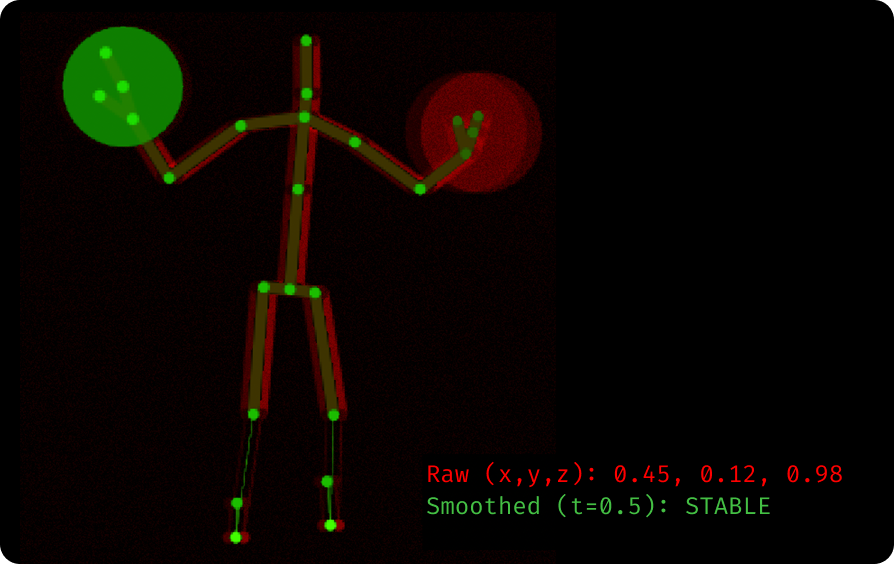
Figure 1: The raw input challenge. Visualizing the “noise” of raw skeletal data (Red) vs. the smoothed interpretation (Green) required to determine intent.
The Prototyping Strategy
We moved away from designing full applications and focused on atomic interactions. We established a culture of “Hallway Testing”—building a prototype in the morning, testing it with passersby in the afternoon, and refining the code by evening.
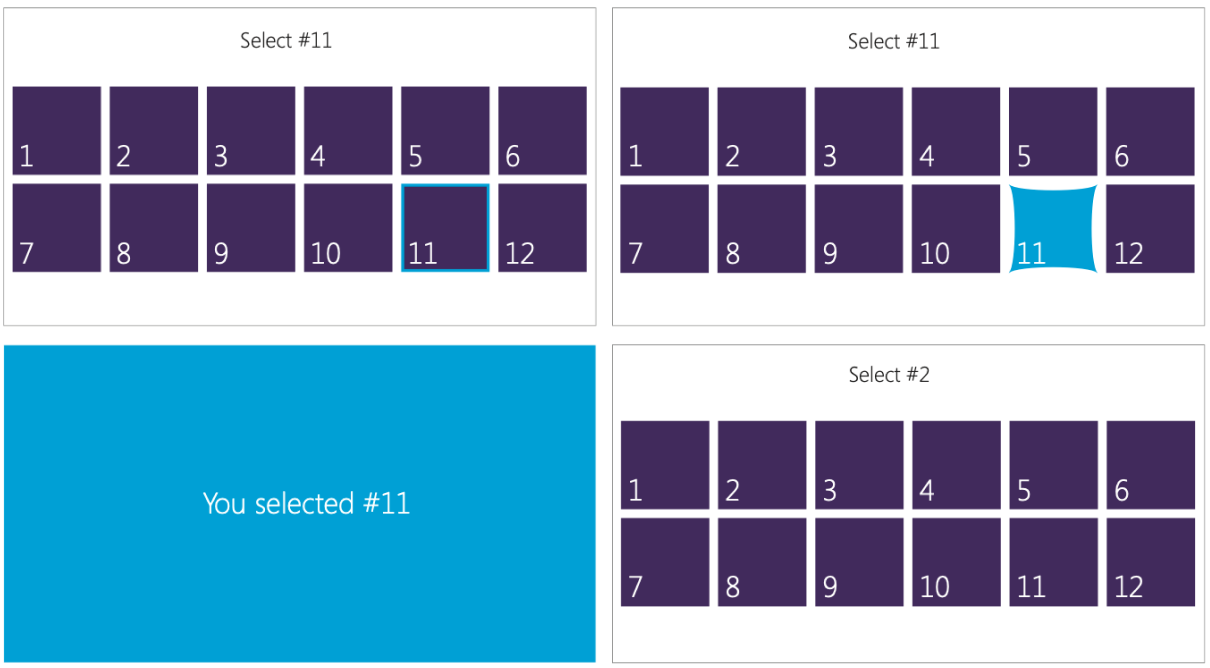
Figure 2:Rapid Iteration. We ran daily “hallway tests” with paper prototypes and raw builds to determine the baseline constraints for human movement.
The Pivot: Why "Natural" Failed
We initially assumed that “Natural User Interface” meant mimicking real life. Our first hypothesis for selecting a button was “Hover-to-Click” (holding your hand still over a button for 2 seconds).
It failed.
The “Penalty Box” Effect: Users reported feeling like they were being punished. They had to freeze their bodies perfectly still, which is physically difficult and mentally stressful.
The “Midas Touch”: Users would accidentally trigger buttons just by looking at them or moving past them.
We realized that for a gesture interface to feel “natural,” it actually needed artificial friction. This insight drove us to scrap the “Hover” model and invent the “Push” metaphor.
Core Interaction Patterns
To bridge the gap between human intent and machine sensing, we developed three flagship patterns.
1. Selection: The “Elastic” Press
The Problem: Without a physical mouse, users lacked the precision to “click” small targets. Hand jitter made standard cursors feel broken.
The Solution: We designed a “Physical Interaction Zone” (Phiz) model using a “Magnetic” cursor that snapped to targets. But magnetics weren’t enough—we also had to redefine the button itself.
The Data: Testing for the “Safety Factor”
We ran extensive sizing tests to determine the “Minimum Viable Target.” While large targets performed well, smaller targets (around 100px) had an unacceptable failure rate of 19%.
Rather than shipping the bare minimum size that “passed” the test, we established a Safety Factor. We took the raw success data and padded the dimensions to create a standardized grid that could absorb environmental noise (lighting, distance) and user error.
Interaction Grid Definition:
| Role | Tested (Success %) | Shipped | Design Decision |
| Secondary | 107 x 107 px (81%) | 220 x 220 px | Failed. Size doubled to ensure hit-ability. |
| Content | 214 x 180 px (88%) | 330 x 330 px | Borderline. Increased to buffer skeletal jitter. |
| Hero/Nav | 363 x 283 px (97%) | 440 x 440 px | Validated. Rounded up to align with grid system. |
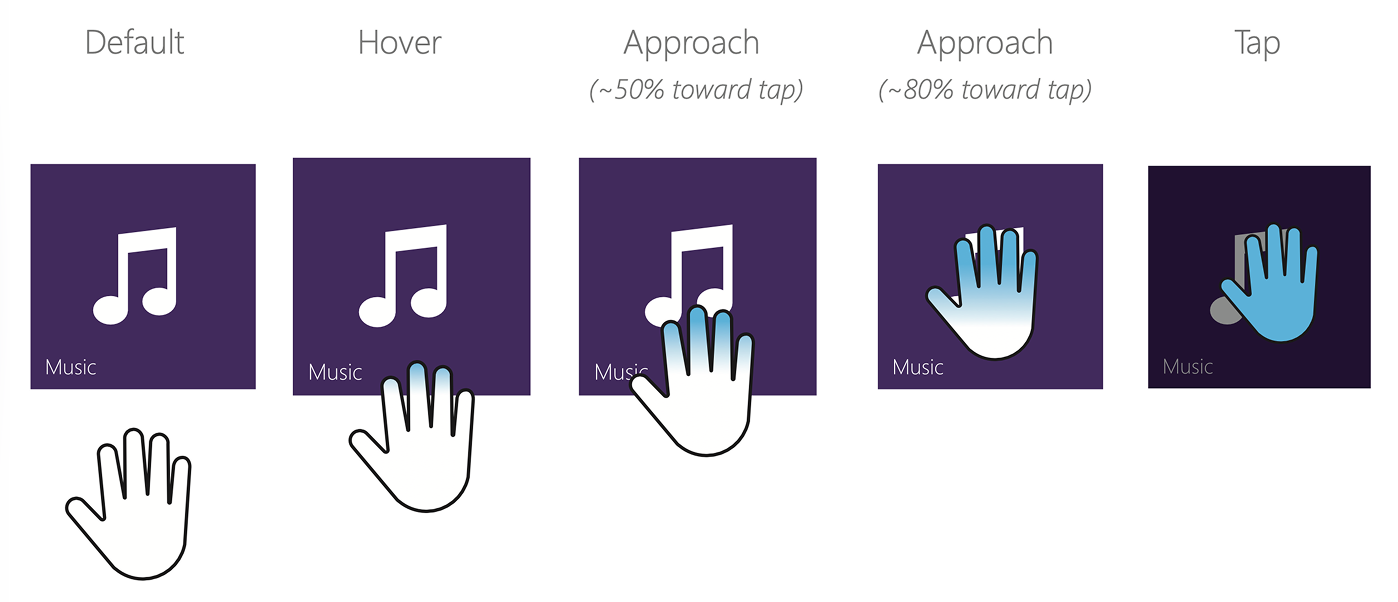
Figure 3: The Reliability Equation. We combined the expanded target dimensions (Safety Factor) with the “Elastic Press” mechanic (visualized here), creating a system that absorbed both lateral jitter and depth noise.
2. Manipulation: Grip-to-Pan
The Problem: “Gorilla Arm.” Users physically cannot hold their arms up long enough to scroll through long lists using standard scrollbars.
The Solution: We changed the mental model from “operating a scrollbar” to “Direct Manipulation.”
The Clutch: We used the “Open Hand” vs. “Closed Fist” state to engage the physics engine.
Inertia: We allowed users to “throw” content. A small flick of the wrist sent the list coasting, saving physical energy.
The Ratchet: We optimized the sensor to recognize the release instantly, allowing users to grab, pull, and release repeatedly—like pulling a rope—to navigate infinite lists without extending their reach.

Figure 4: The “Clutch” states. Visual feedback was critical: The cursor morphed from an Open Hand (Hover) to a Closed Fist (Grab) to signal that the physics engine was engaged.
3. The “State-Aware” Cursor
The Problem: “Blank Canvas Anxiety.” Users would stand frozen, asking “Does it see me?”
The Solution: We replaced the standard arrow pointer with a biologically relatable hand cursor that communicated system confidence in real-time.
Open Hand: “I see you, but you aren’t doing anything.”
Progress: “I see you pushing.” (Visual timer fills up).
Grip: “I am holding this object.”
Outcome & Impact
Adoption:
By the time SDK 1.7 launched, the Kinect for Windows program had scaled to tens of thousands of active developers. The interaction patterns we defined became the standard for touch-free kiosks in healthcare (sterile environments) and retail.
Cross-Platform Legacy:
Our work on the Windows SDK directly influenced the Xbox One interface. Developers pushed back against the platform divide, leading the Xbox team to integrate our “Push” and “Grip” models into the console’s core OS.
“The new interaction controls [in 1.7] are a huge time saver. We used to spend weeks tuning gesture detection; now we just drop a KinectTileButton into XAML and it works.”
— MSDN Forum User, April 2013
Reflection: The AI Parallel
Designing for Kinect was an early masterclass in Probabilistic Design—a challenge that is now defining the modern era of AI.
Then (Kinect): The system had to guess the user’s intent from “noisy” skeletal data.
Now (AI): We are designing for LLMs that must guess intent from “noisy” natural language prompts.
The enduring lesson:
In probabilistic systems, you cannot just pass the raw machine output to the user. You must build an interface that handles uncertainty gracefully.
Kinect: We added “magnetic snapping” to smooth out physical jitter.
AI: We add “guardrails” and “citations” to smooth out hallucinations.
My work on Kinect taught me that the goal isn’t to make the machine perfect; it’s to make the user feel confident in an imperfect system.